
Log in: wifi, systems
Logging into your Email, Wi-Fi, and Swinburne information systems are among the first steps students need to take after enrolling at Swinburne Vietnam. Below is a detailed guide on how to log in to your student email, connect to Wi-Fi, access online information systems, and use library services at Swinburne Vietnam.
Set Up and Log In to Your Student Email
The university will send important announcements to your student email account, so checking your email regularly is essential to avoid missing any key information.
For students in the Global Citizen program (who have not yet chosen a major):
Students will use the personal Google email address they registered with during admission to receive information from the university. This email address will also be used to log in to the Student Portal and receive official announcements from the school.
For students who have already chosen a specific major:
Canvas System and Course Registration
Canvas is the Learning Management System (LMS) that provides online tools for students to access study materials, submit assignments, and receive notifications related to their academic courses.
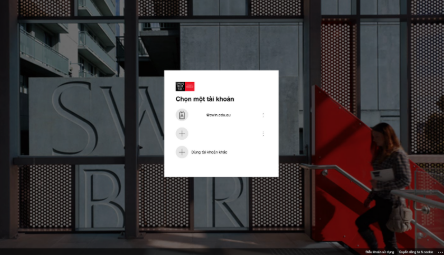
Students will be provided with a Microsoft Office 365 account to log in to both the course registration system and the Canvas system at: https://www.swinburne.edu.au/student-login/
The username will be the student’s email address used for Office 365 login.
The student email format is: [email protected], for example: [email protected].
Your student ID number can be found in your Offer Letter.
Setting Up Your Microsoft Office 365 Password
Students are required to change their password for the first time by following these steps:
- Visit passwordreset.swin.edu.au and click “First time login?”
- Enter your Student ID in the username field and complete the CAPTCHA verification.
- Click “Send Code.” A security code will be sent to the personal email address you registered with the university.
- Check your email for the security code and return to the self-service password management portal to enter the code.
- Click “Reset Password.”
Note: The security code is valid for 10 minutes only. After that, you will need to request a new code.
Multi-Factor Authentication (MFA)
When you first sign in to your Microsoft Office 365 account, you will be required to register for Multi-Factor Authentication (MFA).
MFA provides an additional layer of security by verifying your identity when accessing Swinburne applications and systems. This helps protect both you and Swinburne from unauthorized access.
How to Set Up MFA
- Download the Microsoft Authenticator app on your smartphone.
- Open a web browser on your laptop or computer and visit www.office.com.
- Sign in using your Swinburne Student ID and password.
- Follow the prompts to complete the Microsoft Authenticator verification process.
- Visit https://www.swinburne.edu.au/privacy/cybersecurity-hub/ if you require additional assistance with MFA setup.
Note: It is recommended that you set up multiple authentication methods to protect your account in case you lose your phone, change devices, or change your phone number.
Student Email on Mobile Devices
Download the free Gmail and Microsoft Outlook apps, available on Windows, Mac, Android, and iOS devices. These applications can be downloaded from the Apple App Store, Google Play Store, or Microsoft Store.
Students may also access their email through native mail applications, such as the Mail app on iPhone.
To set up your account, open your preferred email application and add a new email account using your Swinburne email address and password.
Connecting to Student Wi-Fi
Connecting to the Wi-Fi network across Swinburne Vietnam campuses is simple and convenient. Free Wi-Fi access is available at all Swinburne Vietnam locations.
Wi-Fi and IT Support
Swinburne Vietnam support staff can assist students with:
- Connecting to Wi-Fi
- Login issues
- Basic IT support
For the fastest assistance, students can contact Student HQ using the details below:
Hanoi location:
- Phone: 1900 6412 (Press 1)
- Location: Student HQ, Level 1, Swinburne Vietnam, 2 Duong Khue Street, Cau Giay, Hanoi
Da Nang location:
- Phone: 1900 6412 (Press 2)
- Location: Student HQ, Level 1, Swinburne Vietnam Da Nang, 16 2 Thang 9 Street, Hai Chau, Da Nang
Ho Chi Minh City location:
- Phone: 1900 6412 (Press 3)
- Location: Student HQ, Level 1, Swinburne Vietnam HCMC, A35 Bach Dang Street, Tan Son Hoa Ward, Ho Chi Minh City
Can Tho location
- Phone: 0348 766 555
- Location: Student HQ, Level 3, Gamma Building, 600 Nguyen Van Cu Extended Road, An Binh, Can Tho City
Starting with Swinburne
- Contact Us
-
- No. 80 Duy Tan Street, Cau Giay Ward, Hanoi City
- FPT International University Building, Education and Training Zone - Hoa Lac Hi-Tech Park, Km29 Thang Long Boulevard, Hoa Lac Commune, Hanoi City
- A35, Bach Dang Street, Tan Son Hoa Ward, Ho Chi Minh City
- Lot 1+2-A14-16, North Memorial Park, 2/9 Street, Hoa Cuong Ward, Da Nang City
- No. 600 Nguyen Van Cu Street, An Binh Ward, Can Tho City - CALL US ON 0939 403 555
- [email protected]
- @Swinburne
News